


העלאת קבצים היא חלק בלתי נפרד מטפסים רבים, אבל למה להסתפק במשהו בסיסי כשאפשר להפוך את זה לחוויה חכמה, נוחה ומרשימה?
עם השדרוג הזה תקבלו:
✅ אזור גרירה ושחרור (Drag & Drop) – העלאה אינטואיטיבית וקלה יותר.
✅ תצוגה מקדימה של הקבצים – כולל אייקונים שמייצגים את סוג הקובץ.
✅ בר התקדמות דינמי – המחשה ברורה של תהליך ההעלאה בזמן אמת.
✅ אפשרות מחיקת קבצים לפני השליחה – שליטה מלאה למשתמשים.
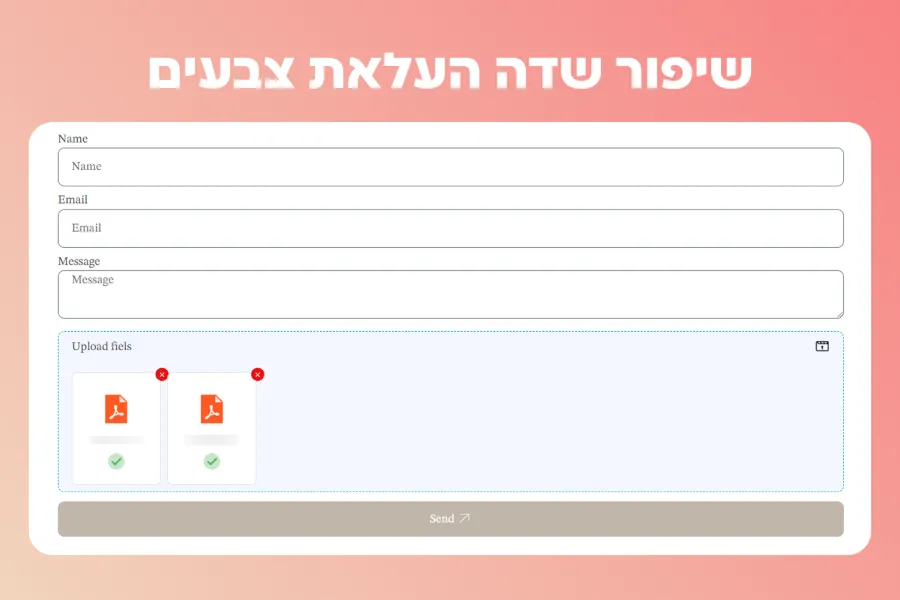
איך מגדירים את העיצוב בטופס?
- מוסיפים את הקוד בתוך ווידג'ט Html מתחת לטופס.
- נותנים לשדה את ה- ID הזה file_upload כדי שהקוד ידע להתייחס אליו.
למה כדאי לשדרג את השדה?
✅ נראה מקצועי ומודרני – הופך את תהליך ההעלאה למגניב וזורם.
✅ שיפור חוויית המשתמש – במקום טופס סטטי, מקבלים ממשק נוח ואינטראקטיבי.
✅ העלאה נוחה יותר – לגרור ולשחרר קבצים במקום לחפש אותם בתיקיות.
✅ הבנה ברורה של סטטוס ההעלאה – המשתמשים יידעו בדיוק מה קורה.

<style>

.elementor-field-type-upload.elementor-field-group.elementor-column.elementor-field-group-file_upload.elementor-col-100 label.elementor-field-label{
    color: #505050;
    display: flex;
    justify-content: space-between;
    align-items: center;
    width: 100%;
}


	.elementor-field-type-upload.elementor-field-group.elementor-column.elementor-field-group-file_upload.elementor-col-100 label.elementor-field-label:after{
    content: url(https://wordpress-1405257-5222437.cloudwaysapps.com/wp-content/uploads/2025/02/clapboard-upload-1.png);
}


/* Styling for the upload area */
.elementor-field-type-upload {
    border: 1px dashed #69727d;
    padding: 10px 20px !important;
    text-align: center;
    background-color: #F4F7FF;
    cursor: pointer;
    border-radius: 10px;
    margin: 5px;
}

.elementor-field-type-upload:hover {
    background-color: #79c14f24;
}

.elementor-field-type-upload input[type="file"] {
    display: none;
}


/* Styling for the uploaded files grid */
.uploaded-files-grid {
    display: grid;
    grid-template-columns: repeat(auto-fill, minmax(120px, 1fr)); /* Ensure multiple columns */
    gap: 10px;
    margin-top: 20px;
    border-radius: 10PX;
    width: 100%; /* Ensure the grid takes up full width of its container */
}

/* Ensures that individual items in the grid are aligned correctly */
.uploaded-file-item {
    display: flex;
    flex-direction: column;
    align-items: center;
    justify-content: center;
    padding: 10px;
    border: 1px solid #ddd;
    border-radius: 8px;
    background-color: #fff;
    position: relative;
}


/* Styling for the file icons */
.uploaded-file-item img {
    width: 50px;
    height: 50px;
    margin-bottom: 10px;
    object-fit: cover;
}

/* Limit text under file to two lines */
.uploaded-file-item span {
    font-size: 12px;
    overflow: hidden;
    text-overflow: ellipsis;
    white-space: nowrap;
    max-width: 80px;
    display: block;
    text-align: center;
}

/* Button to delete a file */
.delete-file-btn {
    height: 20px !important;
    width: 20px !important;
    padding: 0;
    color: white;
    background: #ef0d0d;
    border-radius: 100px;
    border: none;
		line-height: 0;
    position: relative;
		right: -70px;
    top: -18px;
}


/* Styling for the progress wrapper */
.progress-wrapper {
    width: 100%;
    margin-top: 10px;
}

/* Styling for the success icon */
.success-icon {
    width: 30px;
    height: 30px;
    max-width: 30px;
    max-height: 30px;
    margin-top: 10px;
    display: block;
    margin-left: auto;
    margin-right: auto;
    object-fit: contain!important;
    opacity: 0;  /* Initially hidden */
}

/* Styling for the progress wrapper */
.progress-wrapper {
    width: 100%;
    margin-top: 10px;
}

/* Styling for the progress bar */
progress {
    width: 100%;
    height: 10px;
    border-radius: 5px;
    background-color: #f0f0f0;
    border: 1px solid #ccc;
}

/* Optional: styling for the progress bar when it's filling */
progress::-webkit-progress-bar {
    background-color: #f0f0f0;
}

progress::-webkit-progress-value {
    background-color: #14A2DD;
}

</style>


<script>
document.addEventListener('DOMContentLoaded', function() {
  // Global array to store all selected files
  let allFiles = [];
  // Global array to track file names that have been displayed in the UI
  let displayedFiles = [];

  // Initialize the upload area and file input field
  const uploadArea = document.querySelector('.elementor-field-type-upload');
  const fileInput = document.querySelector('#form-field-file_upload');
  const fileList = document.createElement('div');
  fileList.classList.add('uploaded-files-grid');
  // uploadArea.appendChild(fileList);

  // Drag and drop event listeners
  uploadArea.addEventListener('dragover', (e) => {
    e.preventDefault();
    uploadArea.style.backgroundColor = '#79c14f24';
  });
  uploadArea.addEventListener('dragleave', () => {
    uploadArea.style.backgroundColor = '#f9f9f9';
  });
  uploadArea.addEventListener('drop', (e) => {
    e.preventDefault();
    uploadArea.style.backgroundColor = '#f9f9f9';
    handleFiles(e.dataTransfer.files);
  });

  // Input change event listener
  fileInput.addEventListener('change', () => {
    handleFiles(fileInput.files);
  });

  // Function to handle files from both input and drop events
  function handleFiles(files) {
    const newFiles = Array.from(files);
    const filesToUpload = newFiles.filter(file => {
      return !allFiles.some(existingFile => existingFile.name === file.name);
    });

    // If there are new files and fileList is not already appended, then append it
    if (filesToUpload.length > 0 && !uploadArea.contains(fileList)) {
      uploadArea.appendChild(fileList);
    }

    // Continue processing the files (update global array, update UI, etc.)
    allFiles = allFiles.concat(filesToUpload);

    const dataTransfer = new DataTransfer();
    allFiles.forEach(file => dataTransfer.items.add(file));
    fileInput.files = dataTransfer.files;

    filesToUpload.forEach(file => {
      if (displayedFiles.includes(file.name)) return;
      displayedFiles.push(file.name);

      const fileItem = document.createElement('div');
      fileItem.classList.add('uploaded-file-item');

      const deleteBtn = document.createElement('button');
      deleteBtn.textContent = '×';
      deleteBtn.classList.add('delete-file-btn');
      deleteBtn.onclick = () => {
        removeFile(file, fileItem);
      };
      fileItem.appendChild(deleteBtn);

      const fileIcon = document.createElement('img');
      fileIcon.src = getFileIcon(file);
      fileItem.appendChild(fileIcon);

      const fileName = document.createElement('span');
      fileName.textContent = file.name;
      fileItem.appendChild(fileName);

      const progressWrapper = document.createElement('div');
      progressWrapper.classList.add('progress-wrapper');

      const progressBar = document.createElement('progress');
      progressBar.value = 0;
      progressBar.max = 100;
      progressWrapper.appendChild(progressBar);

      fileItem.appendChild(progressWrapper);

      simulateFileUpload(file, progressBar, fileItem, progressWrapper);

      fileList.appendChild(fileItem);
    });
		uploadArea.style.border = "1px dashed #14A2DD";
  }

  function simulateFileUpload(file, progressBar, fileItem, progressWrapper) {
    let uploaded = 0;
    const uploadSpeed = Math.random() * 20 + 10;
    const interval = setInterval(() => {
      uploaded += 2;
      progressBar.value = uploaded;
      if (uploaded >= 100) {
        clearInterval(interval);
        showSuccessIcon(fileItem, progressWrapper);
      }
    }, uploadSpeed);
  }

  function showSuccessIcon(fileItem, progressWrapper) {
    const successIcon = document.createElement('img');
    successIcon.src = 'https://img.icons8.com/color/50/000000/checked.png';
    successIcon.classList.add('success-icon');
    progressWrapper.style.display = 'none';
    fileItem.appendChild(successIcon);
    successIcon.style.opacity = 0;
    setTimeout(() => {
      successIcon.style.transition = 'opacity 0.5s';
      successIcon.style.opacity = 1;
    }, 10);
  }

  function getFileIcon(file) {
    if (file.type.includes('pdf')) {
      return 'https://img.icons8.com/color/50/000000/pdf.png';
    } else if (file.type.includes('word')) {
      return 'https://img.icons8.com/color/50/000000/word.png';
    } else if (file.name.toLowerCase().endsWith('.mp4') || file.name.toLowerCase().endsWith('.mov') || file.name.toLowerCase().endsWith('.avi')) {
      return 'https://img.icons8.com/color/50/000000/video.png';
    } else if (file.name.toLowerCase().endsWith('.wav')) {
      return 'https://img.icons8.com/color/50/000000/video.png';
    } else if (file.name.toLowerCase().endsWith('.xls') || file.name.toLowerCase().endsWith('.xlsx') || file.name.toLowerCase().endsWith('.csv')) {
      return 'https://img.icons8.com/color/50/000000/ms-excel.png';
    } else if (file.type.includes('image')) {
      return URL.createObjectURL(file);
    } else {
      return 'https://img.icons8.com/color/50/000000/file.png';
    }
  }

  function removeFile(file, fileItem) {
    // Remove file from the global array
    allFiles = allFiles.filter(f => f.name !== file.name);
    displayedFiles = displayedFiles.filter(name => name !== file.name);

    // Update the file input accordingly
    const dataTransfer = new DataTransfer();
    allFiles.forEach(f => dataTransfer.items.add(f));
    fileInput.files = dataTransfer.files;

    // Remove the file element from the UI
    fileItem.remove();

    // If fileList is empty, remove it from the DOM
    if (fileList.children.length === 0 && uploadArea.contains(fileList)) {
      uploadArea.removeChild(fileList);
    }
		if (allFiles.length === 0) {
    uploadArea.style.border = "1px dashed #ccc";
		}
  }
});


</script>
לסיכום
אם חשוב לך שאתר ירגיש חלק, חדשני ומזמין, השדרוג הזה הוא מאסט. המשתמשים שלך יהנו מחוויית העלאה אינטואיטיבית, מהירה ונטולת תסכולים.
זה הזמן להוסיף את הקוד ולראות את ההבדל בעצמך! 🚀




תגובה אחת
זה לא מאפשר העלאה על ידי לחיצה, רק גרירה!