


באתרים עם איזור אישי (לא ווקומרס) כשהמשתמש מכניס פרטים שגויים בעמוד ההתחברות הוא מועבר לעמוד ההתחברות של וורדפרס,
כדי להשאיר את המשתמש בעמוד ההתחברות שיצרתם צריך להוסיף את הקוד בתחתית העמוד,
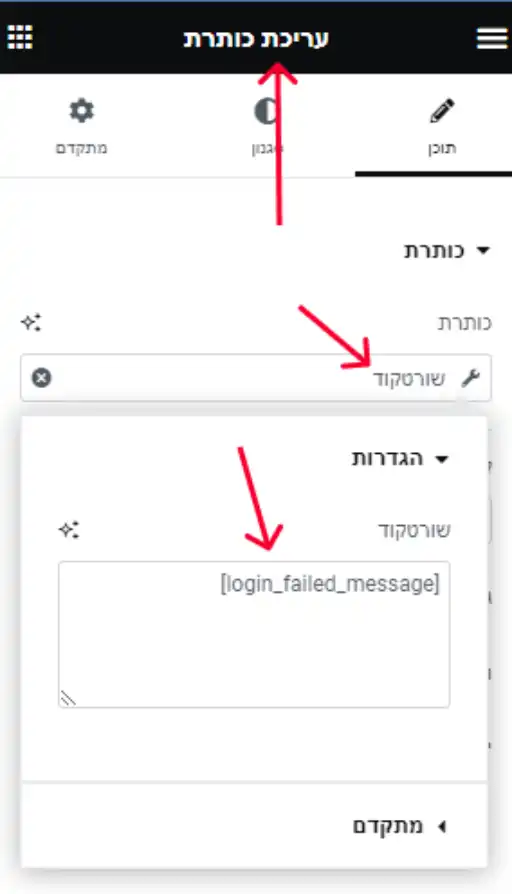
כדי להציג את הודעת השגיאה בעמוד ההתחברות הוסיפו ווידג'ט כותרת ובתנאים דינאמיים תבחרו בשורטקוד ותוסיפו את השורטקוד הבא:
[login_failed_message]
PHP
/*LOGIN PAGE FAILED - DGTOOL - ISRAEL PEER*/
// Failed login notice part 1 - redirecting the user back to the login page with a "failed" URL and error message
add_action( 'wp_login_failed', 'elementor_form_login_fail', 9999999 );
function elementor_form_login_fail( $username ) {
    $referrer = $_SERVER['HTTP_REFERER'];  // where did the post submission come from?
    // if there's a valid referrer, and it's not the default log-in screen
    if ((!empty($referrer) && !strstr($referrer,'wp-login') && !strstr($referrer,'wp-admin') )) {
        //redirect back to the referrer page, appending the login=failed parameter and error message
        wp_redirect(add_query_arg('login', 'failed', $referrer) );
        // add error message
        $_SESSION['login_error_message'] = 'Incorrect username or password';
        exit;
    }
}

// Part 2 -  This is also important. Make sure that the redirect still runs if the username and/or password are empty and display error message
add_action( 'wp_authenticate', 'elementor_form_login_empty', 1, 2 );
function elementor_form_login_empty( $username, $pwd ) {
    $referrer = $_SERVER['HTTP_REFERER'];  // where did the post submission come from?
    if ( empty( $username ) || empty( $pwd ) ) {
        if ((!strstr($referrer,'wp-login') && !strstr($referrer,'wp-admin') )) {
            //redirect back to the referrer page, appending the login=failed parameter and error message
            wp_redirect(add_query_arg('login', 'failed', $referrer) );
            // add error message
            $_SESSION['login_error_message'] = 'Please enter both username and password';
            exit;
        }
        exit();
    }
}

// Remove ?login=failed part of URL after successful login and display error message if it exists
function remove_login_failed_query_arg() {
    // Check if the user is logged in
    if ( is_user_logged_in() ) {
        // Get the current URL
        $current_url = add_query_arg( array() );
        // Check if the URL contains "login=failed"
        if ( strpos( $current_url, 'login=failed' ) !== false ) {
            // Remove "login=failed" from the URL
            $current_url = remove_query_arg( 'login', $current_url );
            // check if there's an error message and display it
            if (isset($_SESSION['login_error_message'])) {
                $error_message = $_SESSION['login_error_message'];
                echo '<div class="login-error">'.$error_message.'</div>';
                unset($_SESSION['login_error_message']);
            }
            // Redirect to the updated URL
            wp_redirect( $current_url );
            exit;
        }
    }
}
add_action( 'template_redirect', 'remove_login_failed_query_arg' );

function display_login_failed_message( $atts ) {
    if ( isset( $_GET['login'] ) && $_GET['login'] === 'failed' ) {
        return '<p>שם המשתמש או הסיסמה שגויים.</p>';
    }
}
add_shortcode( 'login_failed_message', 'display_login_failed_message' );

2 תגובות
ואיך עושים את זה בווקומרס ?
בווקומרס זה כבר מובנה לך, לא צריך לעשות כלום