


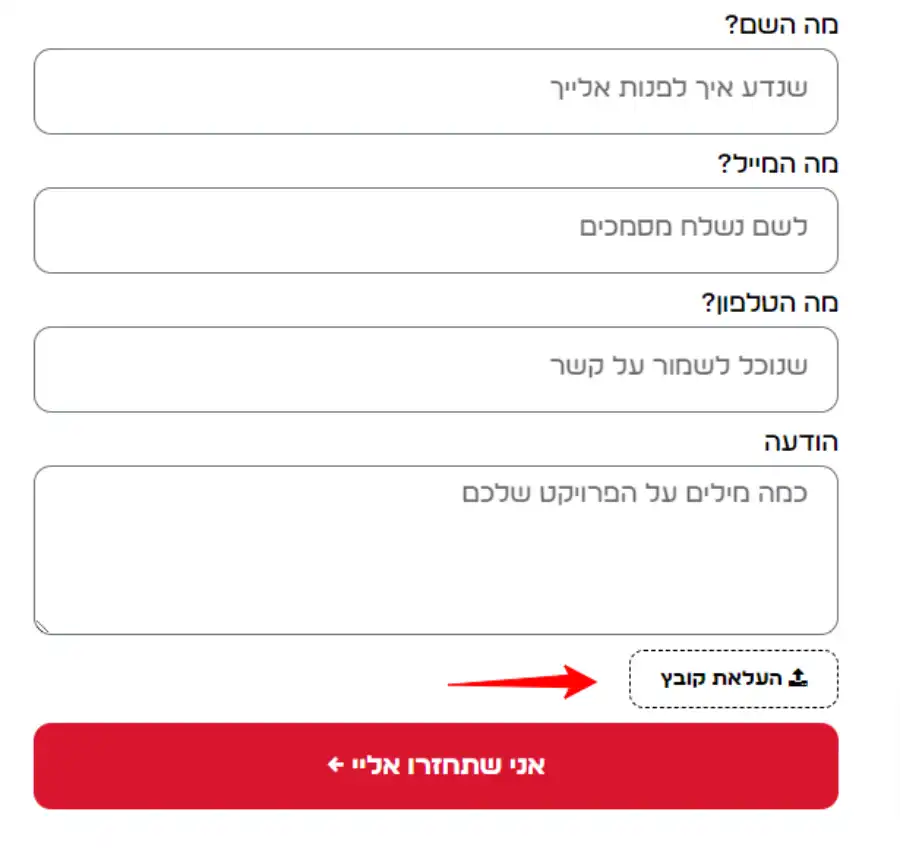
עיצוב שדה העלאת קבצים בטופס אלמנטור לעיצוב מודרני יותר ושינוי טקסט הכפתור, בסוף הקוד תוכלו למצוא את הטקסט של הכפתור ולשנות לטקסט שלכם
PHP
add_action( 'wp_head', function () {
    ?>
    <style>
        .file-input {
            width: 0.1px;
            height: 0.1px;
            opacity: 0;
            overflow: hidden;
            position: absolute;
            z-index: -1;
        }

        .elementor-widget-form .elementor-field-group > .file-input + label,
        .elementor-widget-form .elementor-field-subgroup .file-input + label {
            font-size: .9em;
            font-weight: 700;
            color: #000!important;
            background-color: #fff!important;
            display: inline-block;
            padding: 0.625rem 1.25rem !important;
            cursor: pointer;
            border: dashed 1px!important;
            border-radius: 10px;
        }

        .file-input:focus + label,
        .file-input + label:hover {
            background-color: #722040;
        }

        .upload-success {
            display: none;
            font-size: 0.9em;
            color: #000;
            margin-top: 0.5rem;
			margin-right: 8px;
        }

        .remove-file {
            display: none;
            color: #fff;
            background-color: #f44336;
            border-radius: 50%;
            width: 20px;
            height: 20px;
            text-align: center;
            line-height: 20px;
            cursor: pointer;
            margin-right: 8px;
        }
    </style>
    <script>
        document.addEventListener('DOMContentLoaded', function () {
            var fileInputs = document.querySelectorAll('.file-input');

            fileInputs.forEach(function (input) {
                var removeButton = input.parentElement.querySelector('.remove-file');
                var successMessage = input.parentElement.querySelector('.upload-success');

                input.addEventListener('change', function () {
                    if (this.files.length > 0) {
                        successMessage.textContent = 'הקובץ הועלה';
                        successMessage.style.display = 'inline-block';
                        removeButton.style.display = 'inline-block';
                    }
                });

                removeButton.addEventListener('click', function () {
                    input.value = ''; // Clear the file input
                    successMessage.textContent = '';
                    successMessage.style.display = 'none';
                    removeButton.style.display = 'none';
                });
            });
        });
    </script>
    <?php
});

add_filter( 'elementor_pro/forms/render/item/upload', function ( $item, $item_index, $form ) {
    $item['field_type'] = 'file';
    return $item;
}, 10, 3 );

add_action( 'elementor_pro/forms/render_field/file', function ( $item, $item_index, $form ) {
    wp_enqueue_style( 'font-awesome' );

    $form->add_render_attribute( 'input' . $item_index, 'class', 'file-input elementor-upload-field' );
    $form->add_render_attribute( 'input' . $item_index, 'type', 'file', true );

    if ( ! empty( $item['allow_multiple_upload'] ) ) {
        $form->add_render_attribute( 'input' . $item_index, 'multiple', 'multiple' );
        $form->add_render_attribute( 'input' . $item_index, 'name', $form->get_attribute_name( $item ) . '[]', true );
    }

    if ( ! empty( $item['file_sizes'] ) ) {
        $form->add_render_attribute(
            'input' . $item_index,
            [
                'data-maxsize' => $item['file_sizes'],
                'data-maxsize-message' => __( 'This file exceeds the maximum allowed size.', 'elementor-pro' ),
            ]
        );
    }

    echo '<input ' . $form->get_render_attribute_string( 'input' . $item_index ) . '>';
    echo '<label for="' . $form->get_attribute_id( $item ) . '"><i class="fa fa-upload"></i> בחירת קבצים</label>';
    echo '<span class="upload-success"></span>';
    echo '<span class="remove-file">×</span>';
}, 10, 3 );
במידה ובאתר יש 2 שפות אז העתיקו את הקוד הבא:
PHP
add_action( 'wp_head', function (){
    ?>
    <style>
     .file-input {
            width: 0.1px;
            height: 0.1px;
            opacity: 0;
            overflow: hidden;
            position: absolute;
            z-index: -1;
        }

          .elementor-widget-form .elementor-field-group > .file-input + label,
        .elementor-widget-form .elementor-field-subgroup .file-input + label {
            font-size: .9em;
            font-weight: 700;
            color: #000!important;
            background-color: #fff!important;
            display: inline-block;
            padding: 0.625rem 1.25rem !important;
            cursor: pointer;
            border: dashed  1px!important;
           border-radius: 10px;
        }

        .file-input:focus + label,
        .file-input + label:hover {
            background-color: #722040;
        }

    </style>
    <?php
});

add_filter( 'elementor_pro/forms/render/item/upload', function ( $item, $item_index, $form ) {
    $item['field_type'] = 'file';

    return $item;
}, 10, 3 );

add_action( 'elementor_pro/forms/render_field/file', function ( $item, $item_index, $form ) {

wp_enqueue_style( 'font-awesome' );

   $form->add_render_attribute( 'input' . $item_index, 'class', 'file-input elementor-upload-field' );
   $form->add_render_attribute( 'input' . $item_index, 'type', 'file', true );

   if ( ! empty( $item['allow_multiple_upload'] ) ) {
      $form->add_render_attribute( 'input' . $item_index, 'multiple', 'multiple' );
      $form->add_render_attribute( 'input' . $item_index, 'name', $form->get_attribute_name( $item ) . '[]', true );
   }

   if ( ! empty( $item['file_sizes'] ) ) {
      $form->add_render_attribute(
         'input' . $item_index,
         [
            'data-maxsize' => $item['file_sizes'],
            'data-maxsize-message' => __( 'This file exceeds the maximum allowed size.', 'elementor-pro' ),
         ]
      );
   }

echo '<input ' . $form->get_render_attribute_string( 'input' . $item_index ) . '>';
if (is_rtl()) {
echo '<label for="' . $form->get_attribute_id( $item ) . '"><i class="fa fa-upload"></i> בחירת קבצים</label>';
} else {
echo '<label for="' . $form->get_attribute_id( $item ) . '"><i class="fa fa-upload"></i> Choose Files</label>';
}

}, 10, 3 );
2 תגובות
הבעיה היא שאין שום אינדקציה שהקובץ עלה . לעומת זה שאם לא משים את הקוד אז הוא מראה בריבוע בצד את שם הקובץ שהועלה. אים פותרים את זה?
עדכנתי את הקוד, עכשיו יש חיווי אחרי העלאת הקובץ וכפתור להסרת הקובץ.